#Enhancement
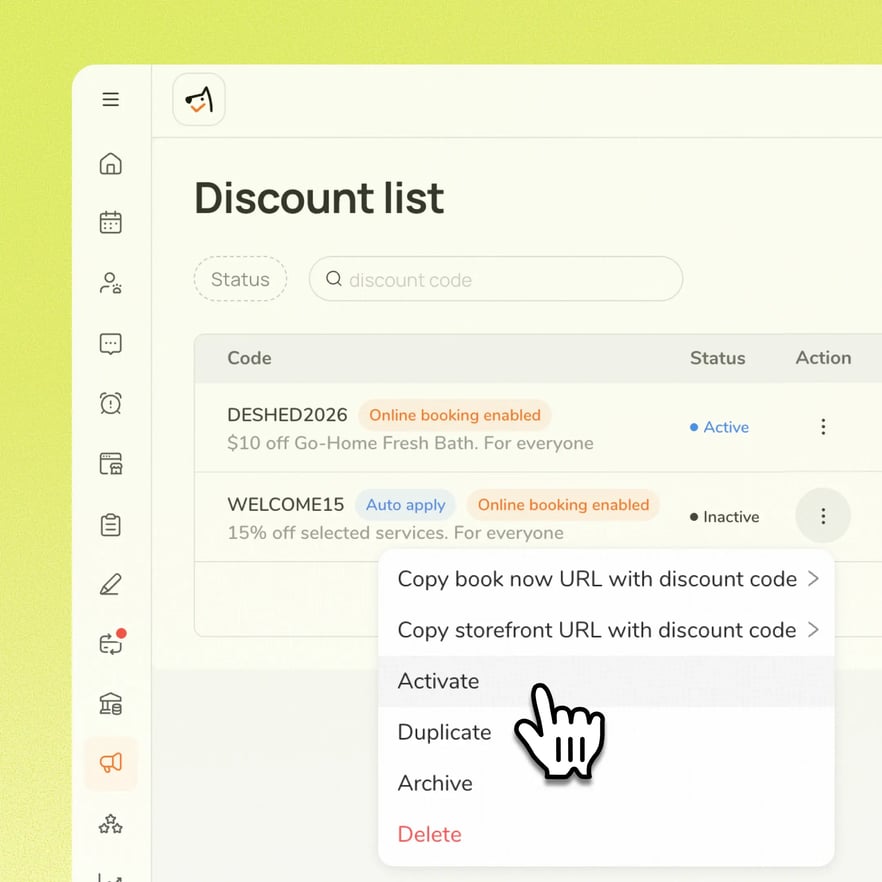
Owners and admins can now reactivate an expired discount code instead of it remaining permanently reserved and unusable. Reactivation preserves the code's existing setup, links, usage limits, and redemption history, with no need to recreate it from scratch.
Use case:
A business wants to bring back a discount code that performed well previously, but it expired and can't be activated as-is. Instead of creating a new code, they reactivate the existing one with a future expiry date, and it's immediately usable again with all original settings and history intact.
👉 How it works
- Go to Marketing → Discounts
- Open the expired code's action menu and select Activate
- Choose a future expiry date (based on the business's local date), or select Never expires
Note: No per-employee assignment on checklist items, and no one-time dated tasks. This is for recurring routines only.
Platform Availability
Web version
Mobile version
Availability


How to access
Marketing → Discounts → [expired code] → Activate
N/A
Before You Start
-
Plan availability: Growth, Ultimate
- Business Type: All