#Enhancement
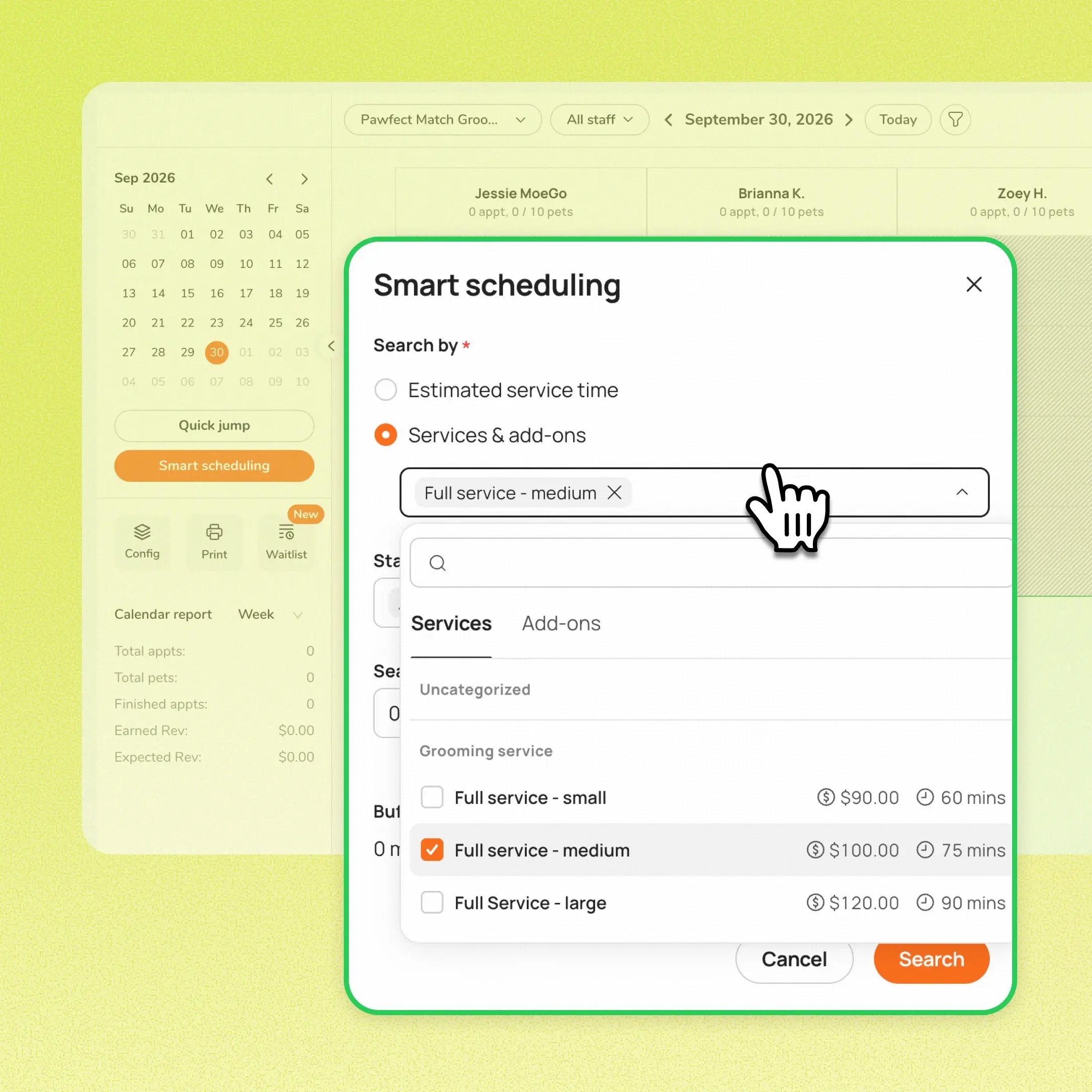
Staff can now select a service and add-ons directly in Smart Scheduling to check availability, without creating a temporary client, pet, or appointment record. Previously, answering a simple availability question from a new caller meant creating a client, entering pet details, and starting an appointment, then cleaning up those records if the caller didn't book.
Use case:
A new caller asks whether there's room for a Full Groom on Friday. Instead of creating a temporary client and pet, the front desk opens Smart Scheduling, selects the service and any add-ons, chooses staff and dates, and sees availability immediately, then creates the appointment through the booking drawer only if the caller wants to book.
👉 How to access:
- Go to Calendar → Smart Scheduling → Service & Add on
- Choose one service, optional add-ons, staff, and dates
- Review the returned availability
- Select add client and book
⚠️ Note:
- Results do not filter staff by service eligibility. Confirm the returned provider performs the selected service before promising a time
- Searches cover one pet only
- Works with By Time, By Slot, and By Points (Beta). The existing estimated-service-time search remains available
- Buffer time is not included in By Slot / By Points results
Platform Availability


Before You Start
-
Plan availability: All plan types
- Business Type: Grooming, Boarding & Daycare