Share this
by MoeGo on Oct 30, 2026, 9:00:02 AM
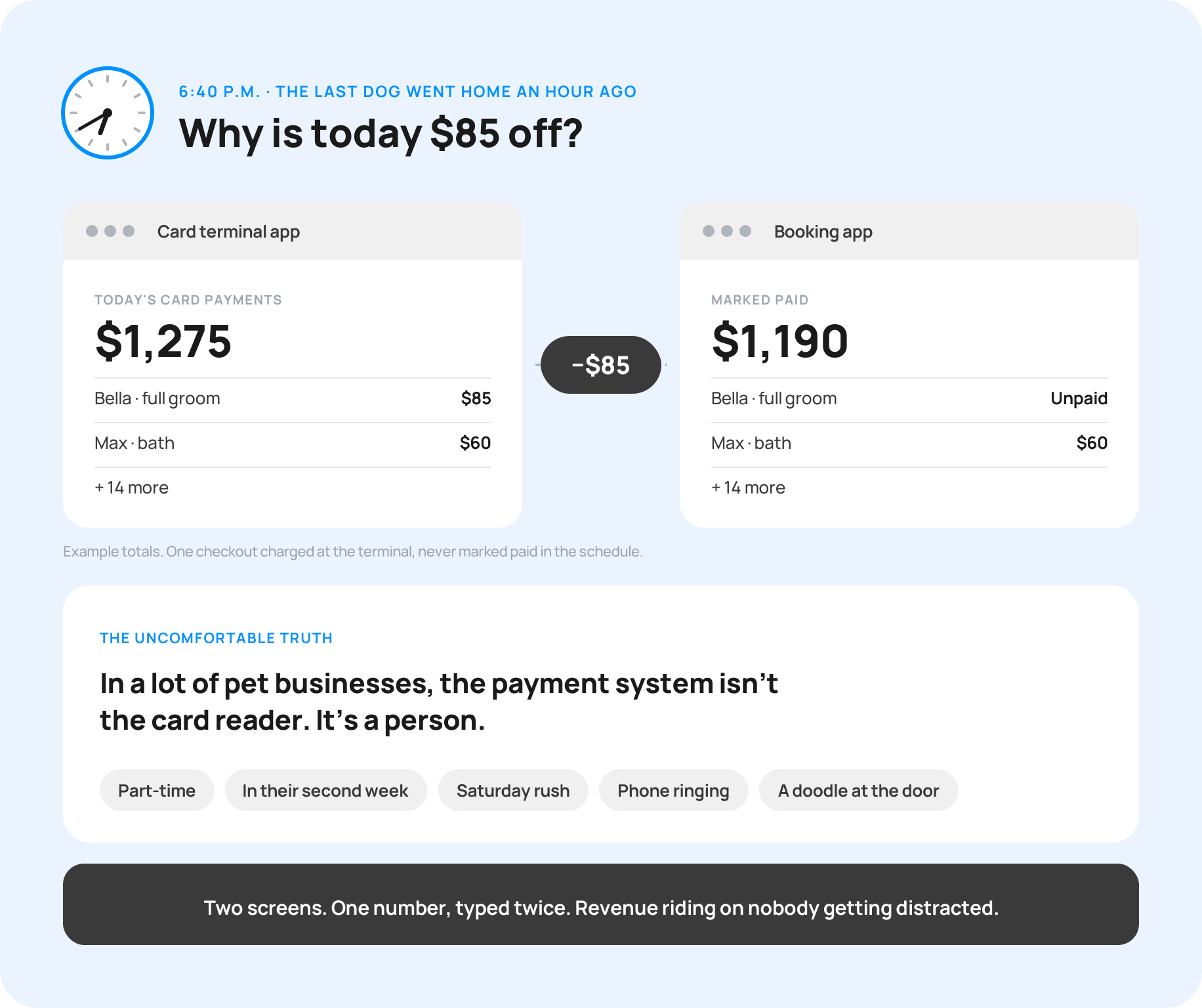
It's 6:40 p.m. The last dog went home an hour ago. You're still at the counter, flipping between two apps, trying to figure out why today is $85 off.
Sound familiar?
Here's the uncomfortable truth. In a lot of pet businesses, the payment system isn't the card reader. It's a person. Usually whoever is at the front desk. Often part-time. Sometimes in their second week. Typing amounts into one screen and marking them paid in another, in the middle of a Saturday rush, with the phone ringing and a doodle at the door.
That's your revenue riding on nobody ever getting distracted.
One business owner in our MoeGo community described what happened when her payments ran in a separate app: checkouts that never got recorded, and books that stopped matching. When another owner was deciding to move to MoeGo Pay, her reason was simple: "So we don't have so many different programs to switch back and forth to."
She didn't want a cheaper way to get paid. She wanted a more reliable one.
Your time is money. So where is it going?
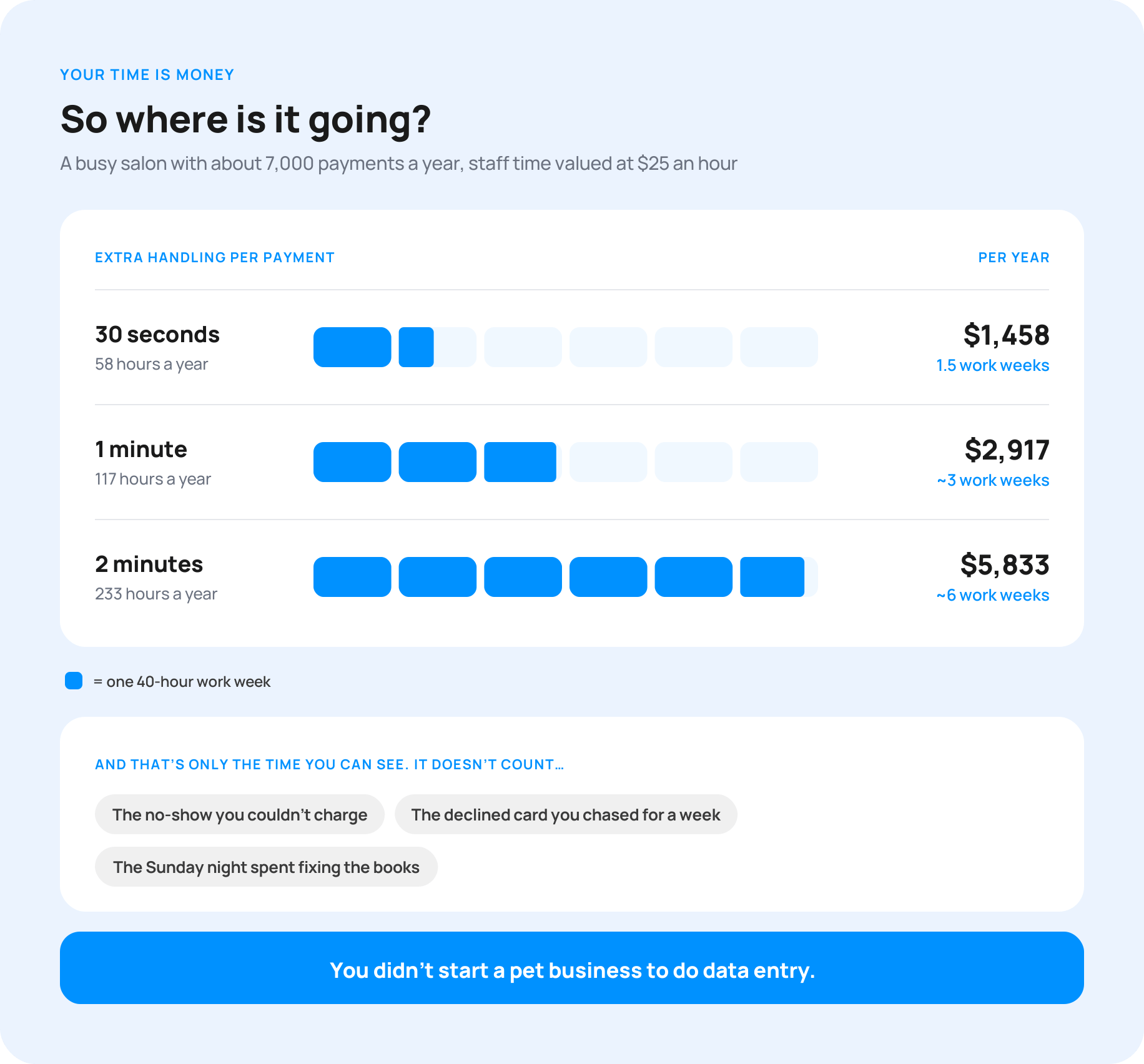
Count it. Take a busy salon with about 7,000 payments a year, and value staff time at $25 an hour:
|
Extra handling per payment |
Hours per year |
What that time costs you |
|
30 seconds |
58 |
$1,458 |
|
1 minute |
117 |
$2,917 |
|
2 minutes |
233 |
$5,833 |
One extra minute per payment is three full work weeks a year. Two minutes is almost six.
And that's only the time you can see. It doesn't count the no-show you couldn't charge, the declined card you chased for a week, or the Sunday night you spent fixing the books.
You didn't start a pet business to do data entry.
What does MoeGo Pay include?
Every payment also comes with work: entering the amount, recording it, matching it to the right appointment, and fixing it when something goes wrong. That work is where the real difference shows up.
1. Charge from the appointment, with no manual entry
"We really enjoy having everything in one place and all streamlined, so that we can focus on scaling our brand." — Chris Elias, Owner, Ruff Life Mobile Grooming
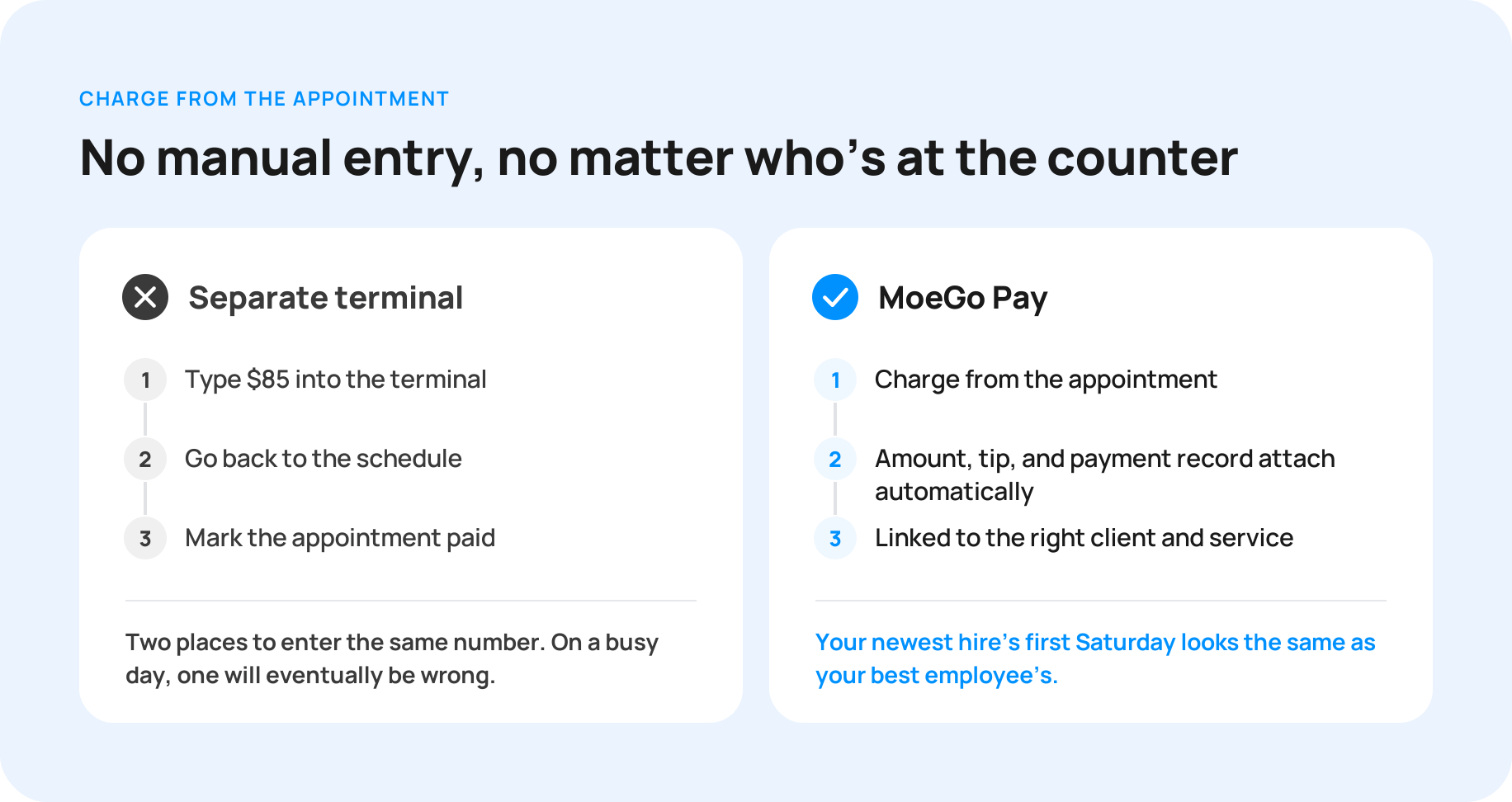
Picture a Saturday rush. A client is checking out, the phone is ringing, and the next dog is at the door. Your front desk types $85 into a separate terminal, then goes back to the schedule to mark it paid.
That's two places to enter the same number. On a busy day, one of them will eventually be wrong: a typo, a missed entry, a payment that never got recorded. Then someone has to find it at closing, or your books are off at month end.
With MoeGo Pay, your front desk doesn't enter the amount. The appointment does. The charge, the tip, and the payment record attach to the right client and service automatically. Nothing to re-enter means nothing to mistype, no matter who's working the counter.
The difference: your newest hire's first Saturday looks the same as your best employee's.


Maximizing Holiday Success with MoeGo Pay: Ruff Life’s Secret to Managing the Rush
Chris Elias, owner of Ruff Life, has 3 favorite MoeGo Pay features: No-Show Protection, Customized Payment Option by Clients, and the Customizable Tipping Screen. These tools help streamline operations, enhance customer satisfaction, and boost revenue during the busiest time of the year.
2. No-shows and chargebacks stop costing you
"It's so much better to have cancellations and reschedules than no shows because you can prepare for it and 48 hours is usually enough time to get someone from our wait list or whatever to fill that spot and prepare. So it really protects the business." — Abby Rose, General Manager, Jess Rona Grooming Salon
Saved cards are how you collect deposits, charge no-show fees, and check out regulars without a reader. But a saved card is only useful if it works when you need it, and if you're protected when a client pushes back.
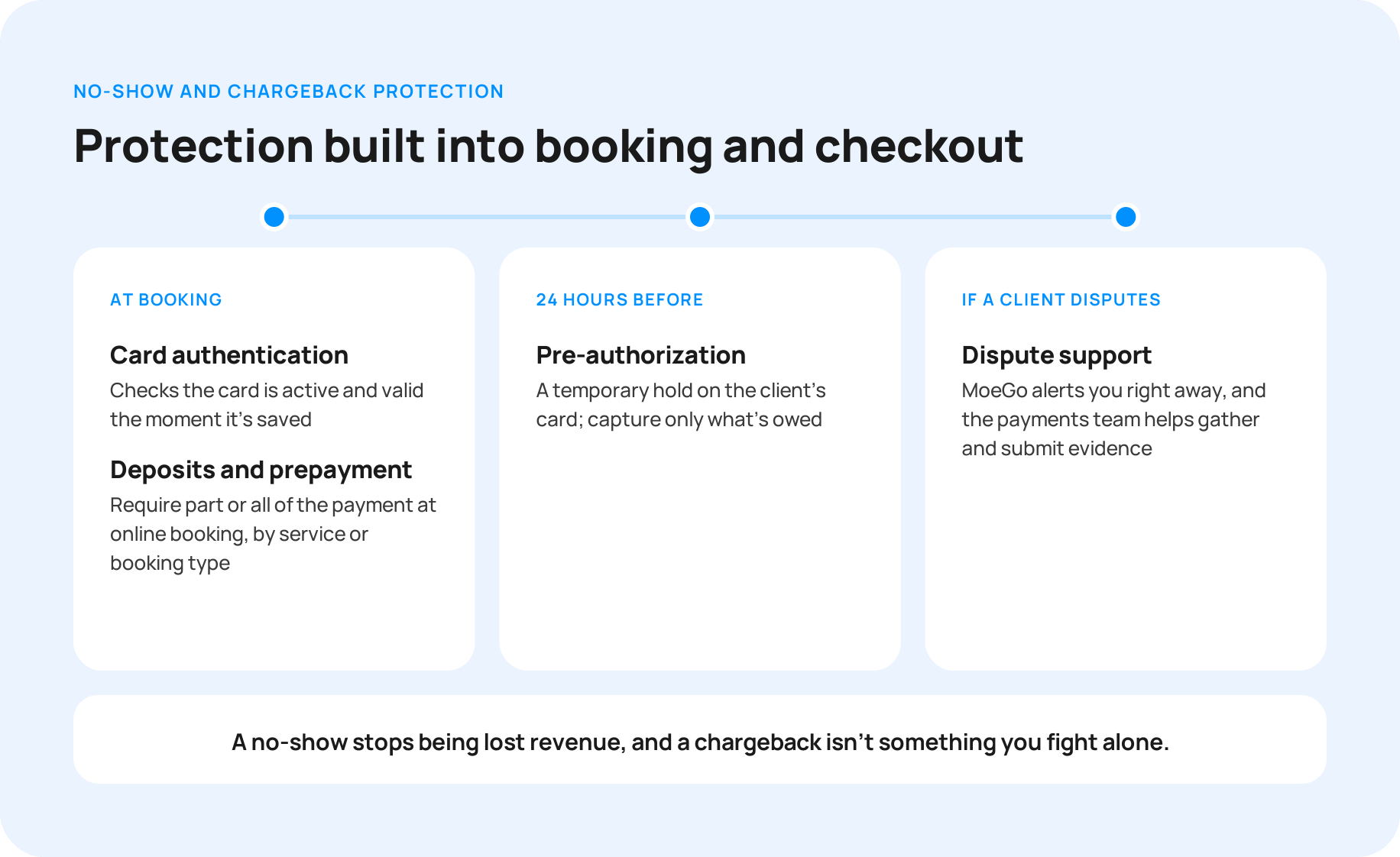
MoeGo Pay builds that protection into booking and checkout:
- Card authentication. MoeGo Pay checks that a card is active and valid the moment it's saved, so the no-show fee you rely on later actually goes through.
- Deposits and prepayment. Require part or all of the payment when clients book online, with rules by service or booking type.
- Pre-authorization. A temporary hold goes on the client's card 24 hours before the appointment, and you capture only what's owed.
- Dispute support. If a client disputes a charge, MoeGo alerts you right away and the payments team helps you gather and submit evidence, like service details, signed agreements, and messages.
The difference: a no-show becomes a policy, not a loss.

How Jess Rona Grooming Recorded Only 3 No-Shows a Year
Jess Rona Grooming Salon recorded just 3 no-shows in a full year by pairing automated reminders and MoeGo Pay's no-show protection with policies enforced up front.
3. You decide who pays the processing fee
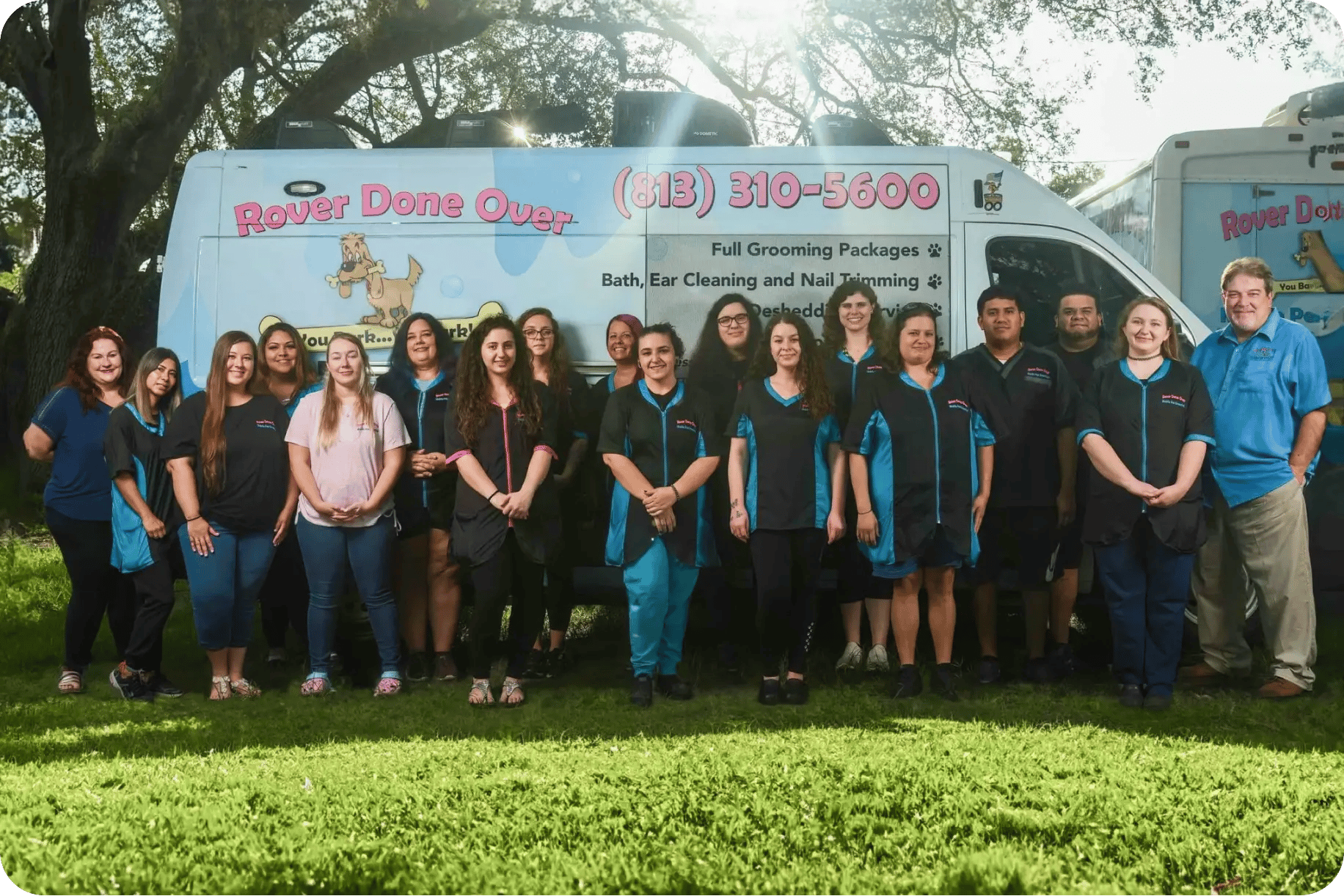
“This was the fee we had to pay out. So really, in actuality, that’s a lot of money saved.” — Gretchen, owner of Rover Done Over
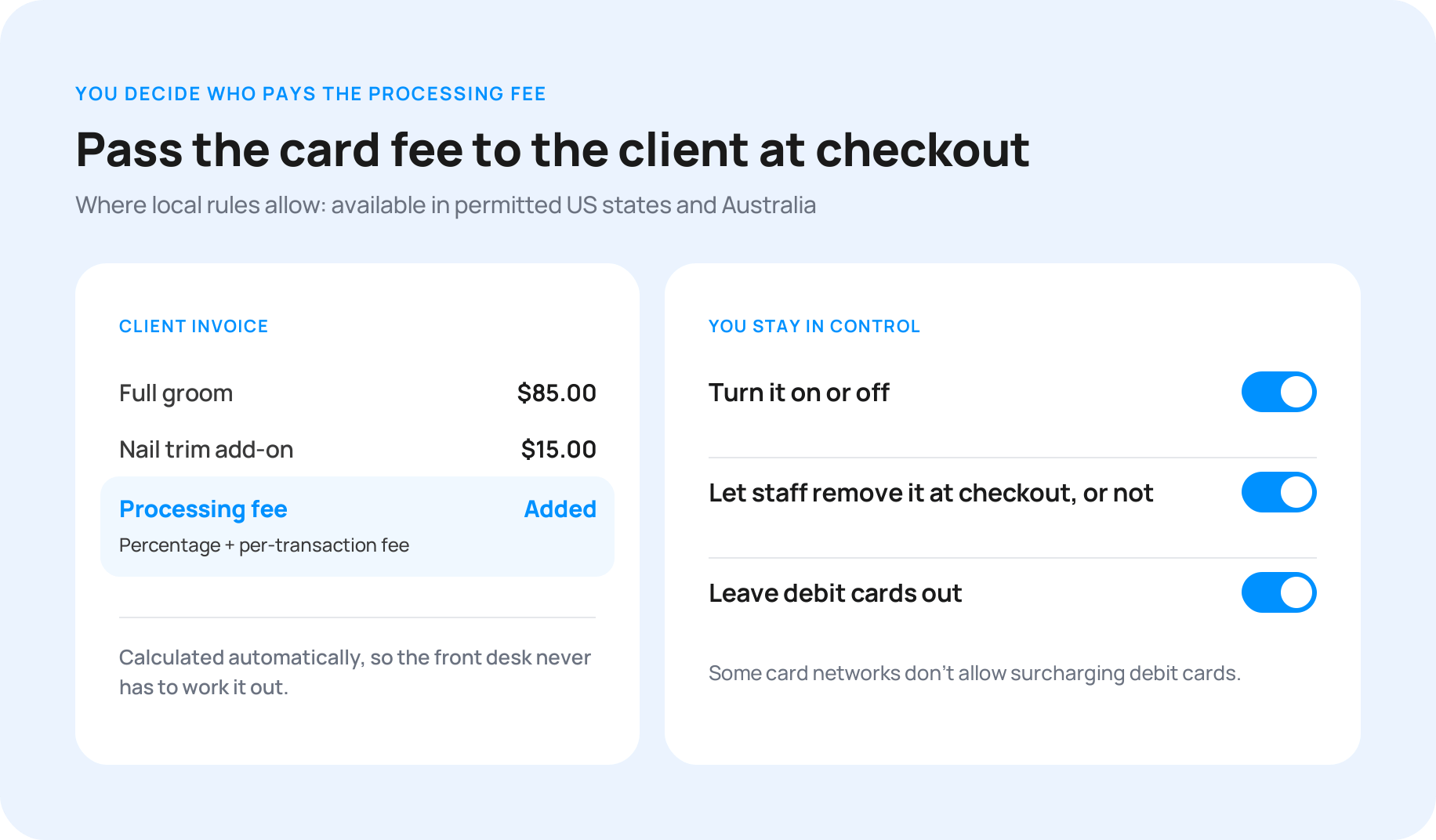
Card fees are part of doing business, but they don’t have to come out of every service. Where local rules allow, MoeGo Pay can add the processing fee to the client’s invoice at checkout, covering both the percentage and the per-transaction fee. It’s calculated automatically, so your front desk never has to work it out.
You stay in control. Turn it on or off, choose whether staff can remove it at checkout, and leave debit cards out if you prefer, since some card networks don’t allow surcharging them. Processing fee by client is available in permitted US states and Australia.
The difference: card fees stop quietly eating every service.
How a 10-Van Grooming Business Slashed $1,200/Week in Fees and Boosted Cash Flow
$1,200 saved weekly. Fewer daily calls for staff. How?
For Rover Done Over, they’re the result of a strategy that turned workflow issues into streamlined success, all powered by MoeGo Pay.
4. Every dollar accounted for, and in your bank tomorrow
"Has this client paid?" "What happened with that refund?" "When does this week's money land?" These questions eat time when the answers live in different apps.
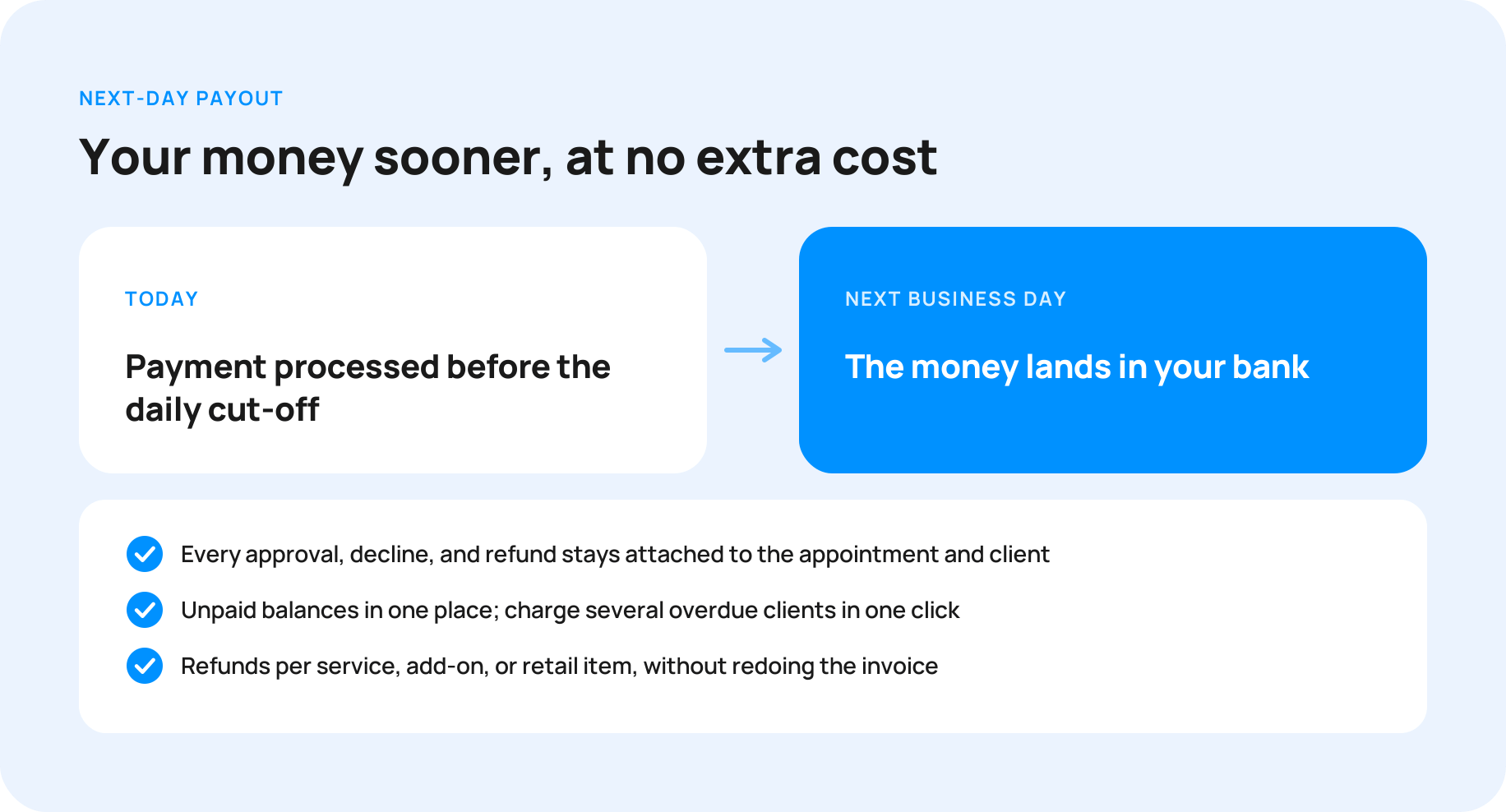
With MoeGo Pay, every approval, decline, and refund stays attached to the appointment and the client. Anyone on your team can answer a payment question from the same screen they already use. Unpaid balances show up in one place, and you can charge several overdue clients in one click. Refunds can be issued per service, add-on, or retail item without redoing the whole invoice.
And the money itself can arrive faster. With Next-Day Payout, payments processed before the daily cut-off land in your bank the next business day, at no extra cost. That helps when payroll, rent, or a supply order is due.
The difference: you close out the day in minutes, and payroll never waits on a payout.
5. A small touch for the holidays
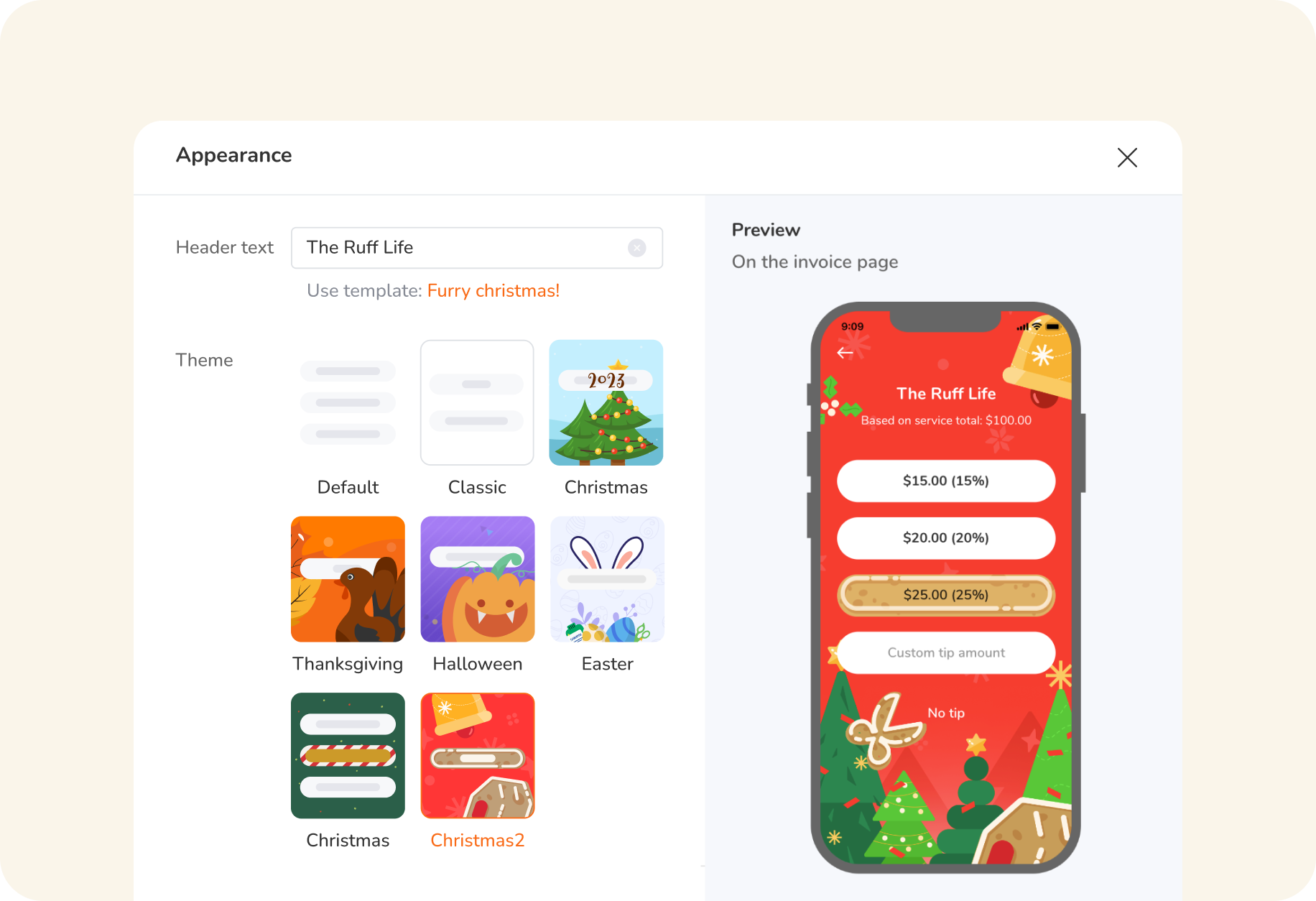
Checkout is the last thing your client sees, so it should feel like your business. Add your logo to the payment screen, set your own suggested tip percentages, and switch on a seasonal look for the holidays, with Thanksgiving and Christmas themes and your own thank-you message.
"But another processor is cheaper."
Maybe on paper. Let's run the numbers for a typical busy salon: about 7,000 payments and $600,000 in card volume a year, with most payments taken in person.
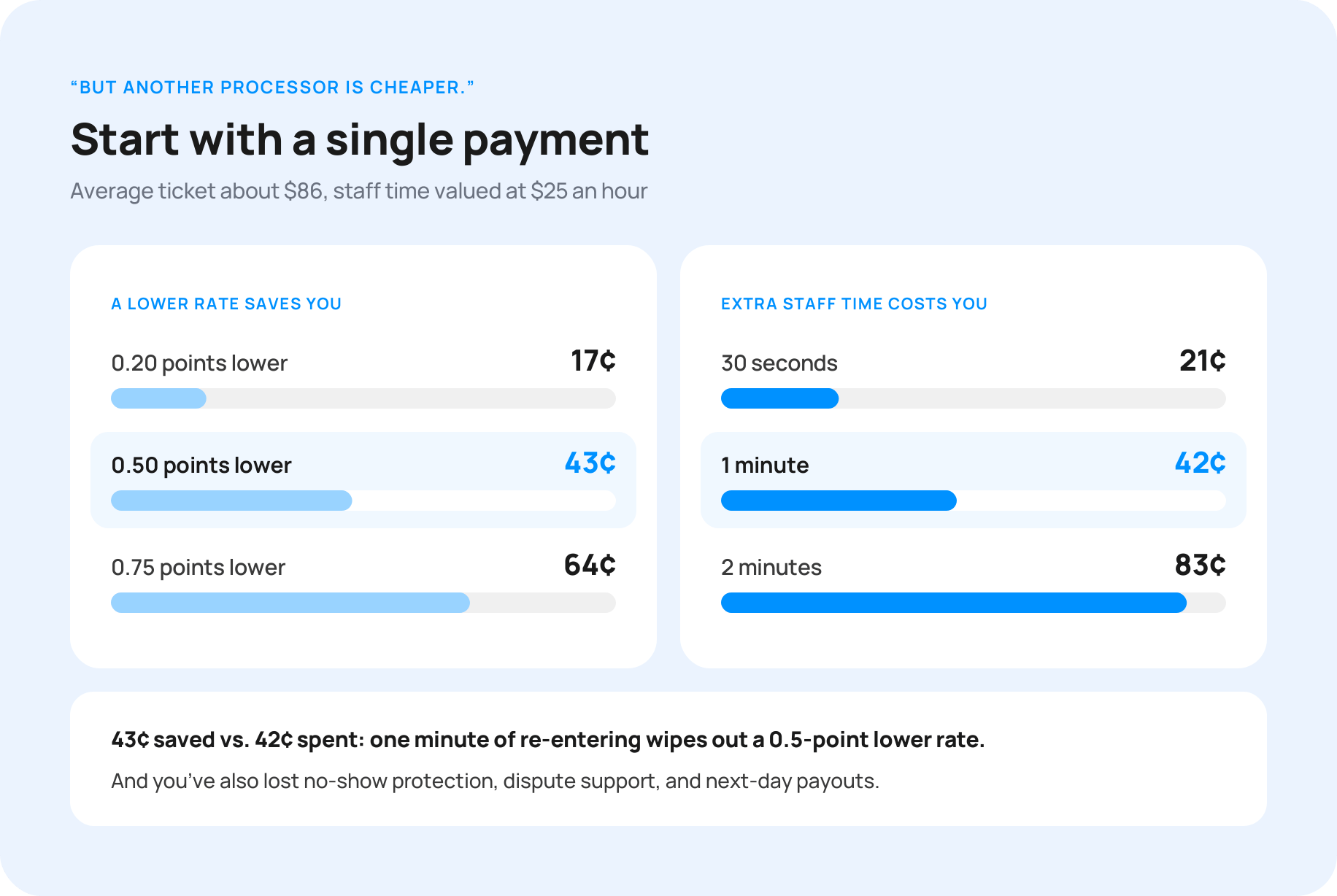
Start with a single payment
With an average ticket of about $86, here's what a lower rate elsewhere saves on each payment, next to what extra staff time costs at $25 an hour:
|
A lower rate saves you |
Extra staff time costs you |
||
|
0.20 points lower |
17¢ |
30 seconds |
21¢ |
|
0.50 points lower |
43¢ |
1 minute |
42¢ |
|
0.75 points lower |
64¢ |
2 minutes |
83¢ |
A rate 0.5 points lower saves about 43¢ a payment. One minute of your team's time costs 42¢. Spend a minute re-entering and checking, and the "cheaper" processor saves you nothing. Except now you've also lost your no-show protection, your dispute support, and your next-day payouts.
Now multiply it by a year
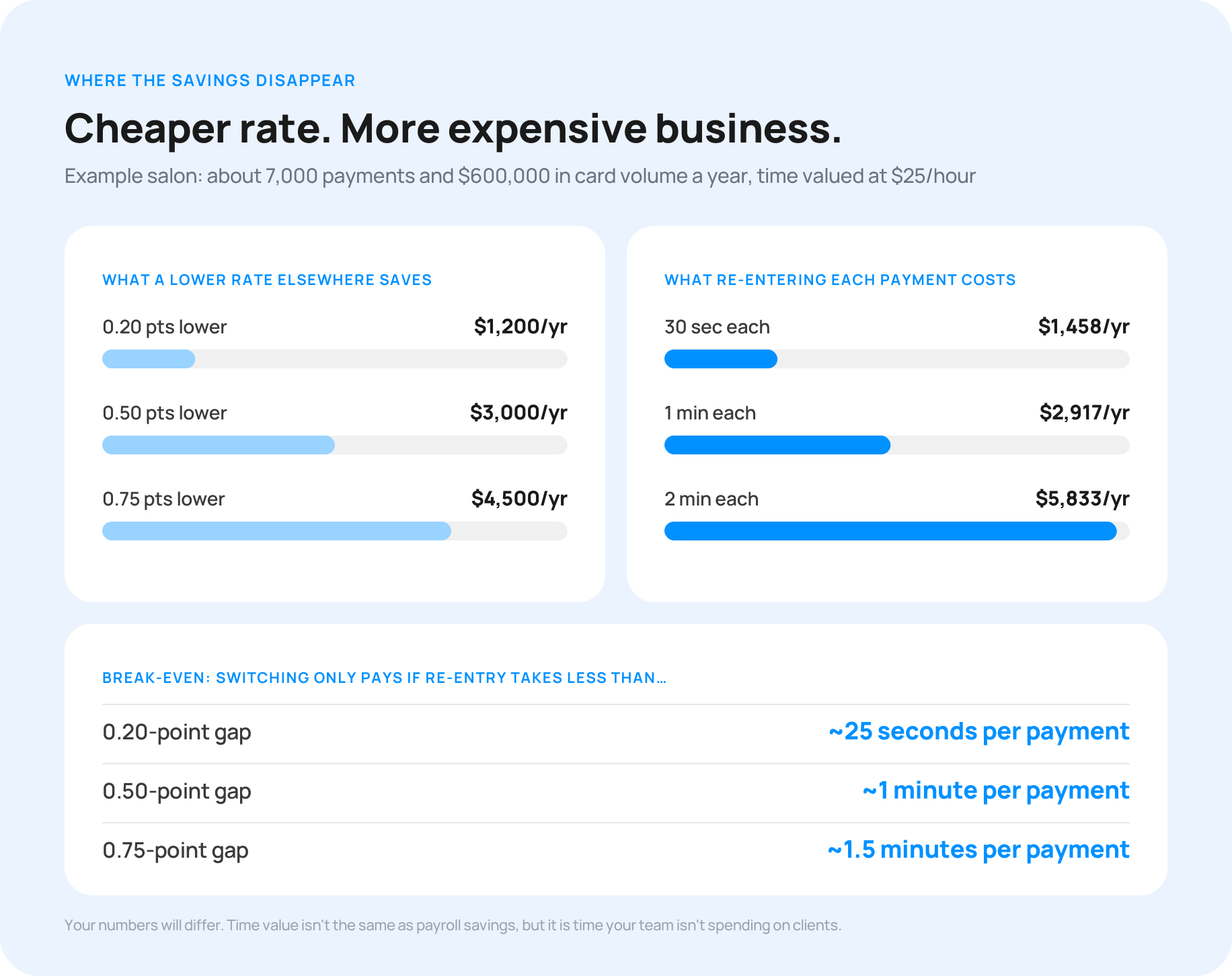
If the other processor doesn't sync with your booking software, someone re-enters and checks each payment. A small task repeated 7,000 times adds up:
|
Extra time per payment |
Hours per year |
Time value at $25/hour |
|
30 seconds |
58 |
$1,458 |
|
1 minute |
117 |
$2,917 |
|
2 minutes |
233 |
$5,833 |
Where the savings disappear
A 0.20-point gap breaks even at about 25 seconds of extra work per payment. A 0.50-point gap breaks even at about one minute, and a 0.75-point gap at about a minute and a half. Past that point, the lower rate costs you more than it saves.
And that’s before counting what you give up: no-show protection, dispute support, and next-day payouts.
Your numbers will be different. If your other option syncs automatically, or you’d only move some payments, the work side shrinks. If your team already makes entry mistakes, it grows. Time value isn’t the same as payroll savings, but it is time your team isn’t spending on clients.
Cheaper rate. More expensive business.
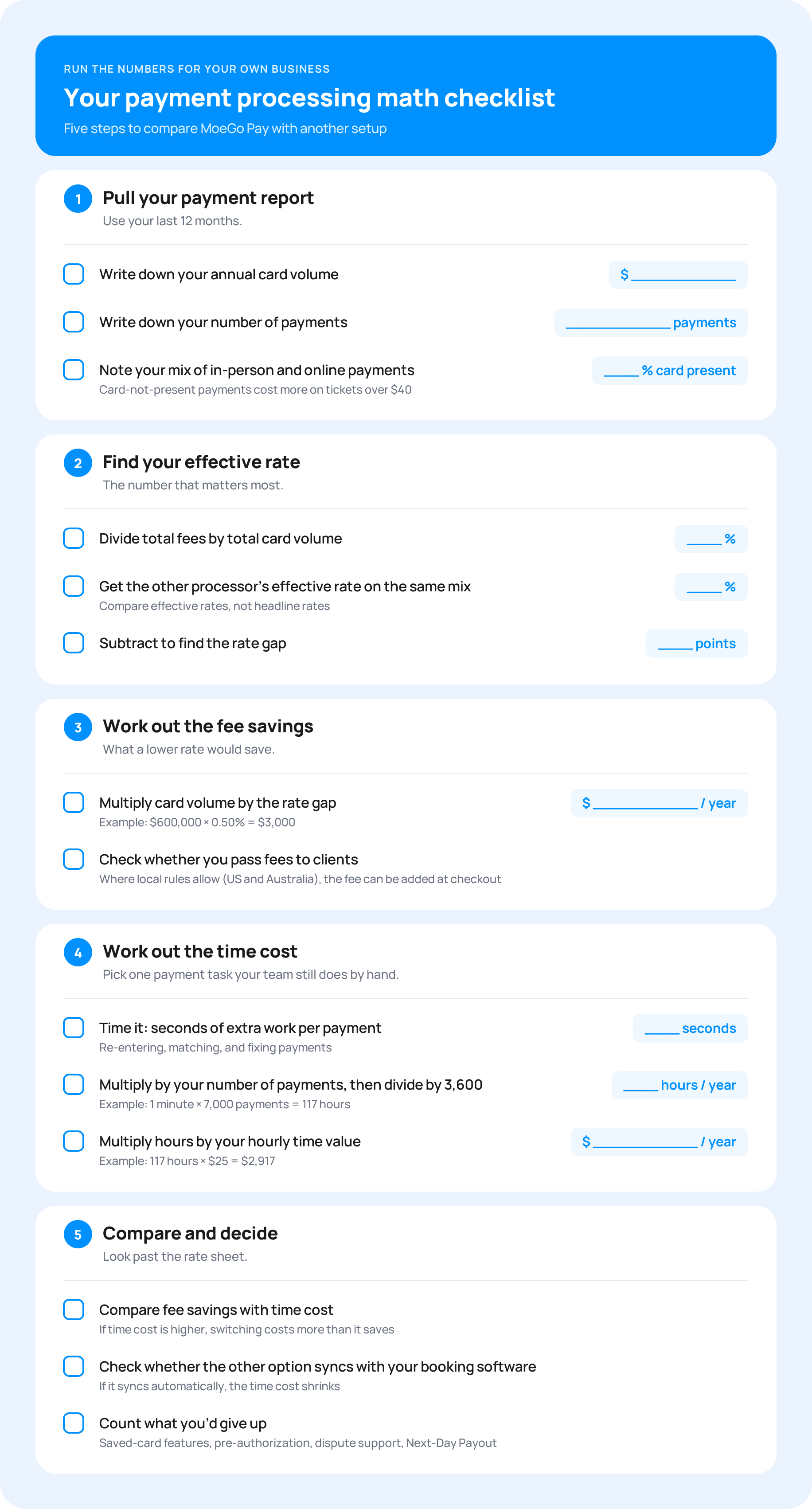
Run the numbers for your own business
The rate on a pricing page is only half the story. The other half is how many payments your team handles, how they take them, and how much time goes into keeping records straight.
Here’s how we can do the math: open your payment report, find your effective rate, and pick one payment task your team still does by hand.
Can I use MoeGo without MoeGo Pay?
We know some of you were frustrated when the Square integration ended, and that's fair. You don't have to use MoeGo Pay to use MoeGo. You can take payments elsewhere and record them in MoeGo as an external payment, so your appointments and reports stay complete. Choosing how you take card payments in MoeGo
What would be missing is the connection: the re-entry, the saved-card features, and the automatic records described above. For some businesses that trade-off makes sense. We'd just like you to make it with the full picture.
.webp?width=1832&height=1372&name=09-moego-pay-vs-external%20(1).webp)
Frequently asked questions
Can I pass credit card processing fees to my clients?
Yes, where local rules allow. MoeGo Pay can add the processing fee to the client's invoice at checkout, covering both the percentage and the fixed fee. It's available in permitted US states and Australia, and you can exclude debit cards, which some card networks don't allow surcharging. 👉 Learn how
How fast do MoeGo Pay payouts arrive?
With Next-Day Payout, payments processed before the daily cut-off arrive in your bank the next business day, at no extra cost. 👉 Learn about Next-Day Payout
How does MoeGo Pay help prevent no-shows?
You can require deposits or prepayment at online booking, save and verify cards on file, and place a pre-authorization hold 24 hours before the appointment. If a client doesn't show, you can charge the no-show fee to the saved card.
What card readers work with MoeGo Pay?
MoeGo Pay works with the WisePOS E smart reader, the M2 Bluetooth reader, and Tap to Pay on iPhone with no extra hardware. 👉 Shop hardware

Just starting or adding to your business?
We have flexible plans meant for all stages.


What Makes MoeGo Pay Worth It? Hear From Top Pet Businesses

Work Smarter, Not Harder: How Jess Rona Grooming and Colby's Dogcare Automate the Everyday with MoeGo